 - Knowledge Base
 Voice Mail is a feature in a Private Branch Exchange (PBX) telephone system that allows callers to leave recorded voice messages when the recipient is unavailable or does not answer. Voice Mail are stored in the system and can be accessed later by the user. Users can listen to, manage, or download these recordings for follow-up
- Sign in to AgentFront CRM.
- From the top menu, select PBX.
- The PBX – Dashboard opens by default.

- Select Voice Mail from left side panel.
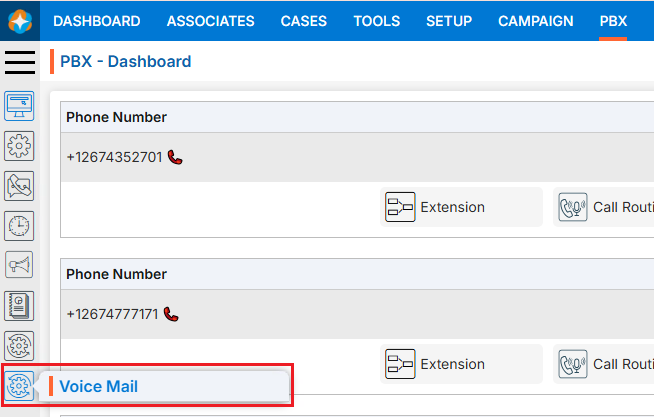
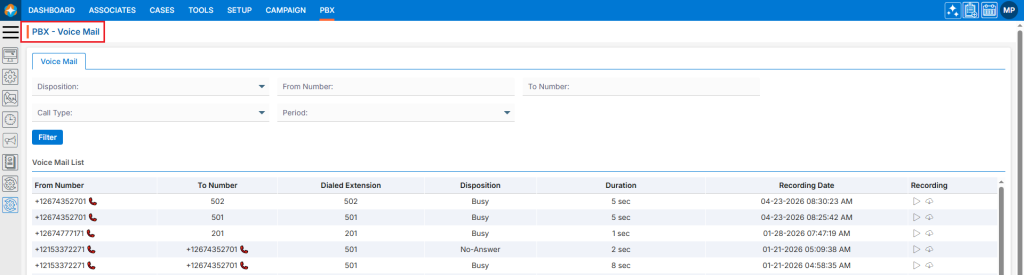
- The Voice Mail page will open.
- This Voice Mail page will display all available Voice Mail logs by default.
- There is also a filter option to search for specific Voice Mails.
Voice Mail List Details:
- The Voice Mail page displays Voice Mail List in a structured list view
- Each entry represents a Voice Mail List and includes:
- From and To Phone number
- Dialer Extension
- Disposition
- Duration
- Recording Date
- Recording with Play (
 ) and Download (
 )options:
- The Play () icon is used to listen to recorded audio.
- Download () icon is used to download and save the recorded audio file for future use.

- The Play (
- Each entry represents a Voice Mail List and includes:
Filter Voice Mail:
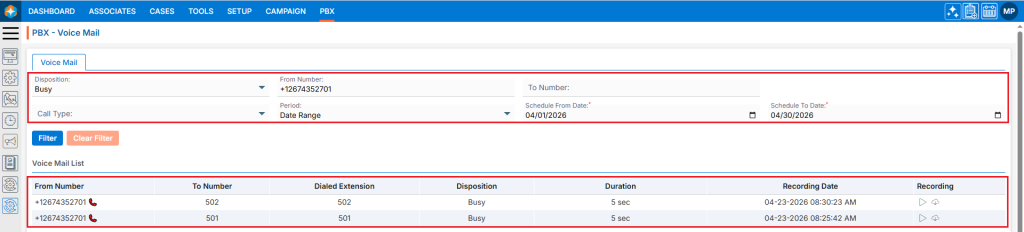
- Users can search for specific Voice Mail data using the filter option.
- Following fields are available to apply Filter:
- Description
- From Number
- To Number
- Call Type
- Period
- Select the required field(s) and click on Filter.
- Based on the selected fields the Voice Mail results will be displayed.
 0
0
 0
0