 - Knowledge Base
 An “Unsuccessful Login” occurs when a user attempts to log in with incorrect credentials. This process generates error messages and may limit login attempts for security purposes.
Steps to Perform an Unsuccessful Login
- Open Agentfront CRM link
- Enter the username and click the ‘Continue’ button to proceed.
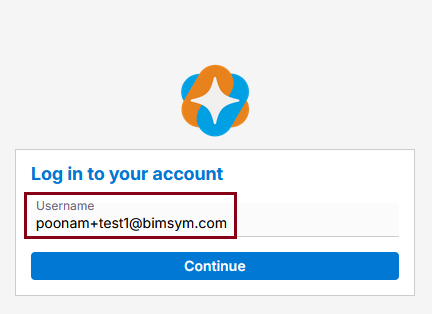
- A prompt appears asking for the password.
- Enter an incorrect password.
- An error message is displayed stating: Invalid Password.
- If an incorrect password is entered a second time, the same message is displayed:
Invalid Password.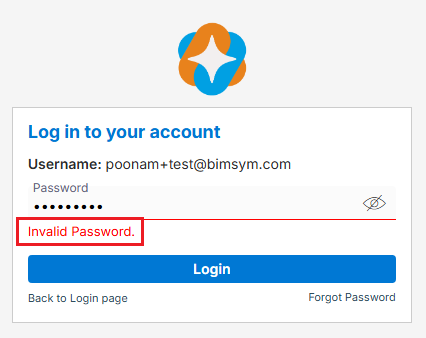
- If an incorrect password is entered three times, the message changes to:
Invalid Password. Please use the ‘Forgot Password’ link below to reset your password and avoid being locked out.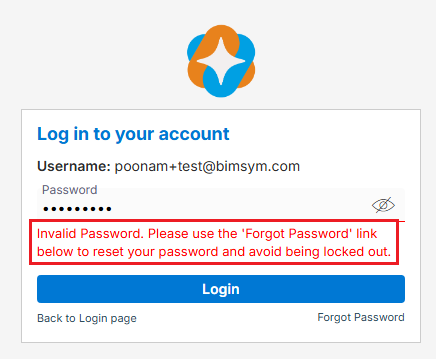
- If an incorrect password is entered four times, the same message is displayed:
Invalid Password. Please use the ‘Forgot Password’ link below to reset your password and avoid being locked out.
This is your last attempt. If you fail again, your account will be locked.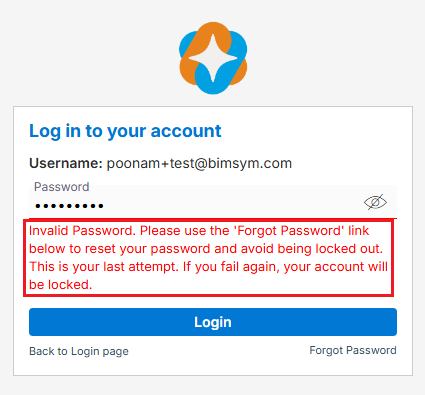
- If an incorrect password is entered five times, the account is locked, and the following message is displayed:
“Your account has been locked. Please use the ‘Forgot Password’ link below to reset your password and regain access to your account.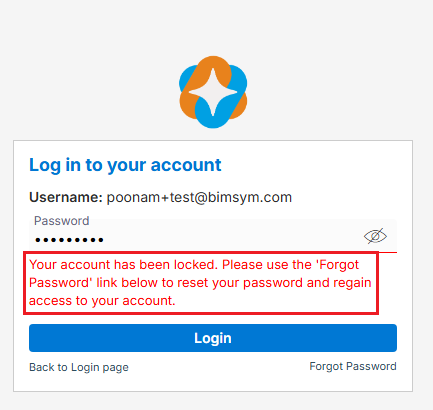
- Once the account is locked, the user cannot log in.
- To access the account again, the user must use the “Forgot Password” option or contact the administrator for help.
 0
0
 0
0