 - Knowledge Base
 An associate summary typically refers to the key fields or sections in an associate summary that capture essential information about the associate. These fields provide a concise, organized overview for quick and easy reference.
Associate Summary Setup
- Sign in to AgentFront CRM
- From the top menu, choose SETUP
- Setup > Quick Profile > Cases Quick Profile setup page will open by default
- Click on Quick Profile > Associate Summary
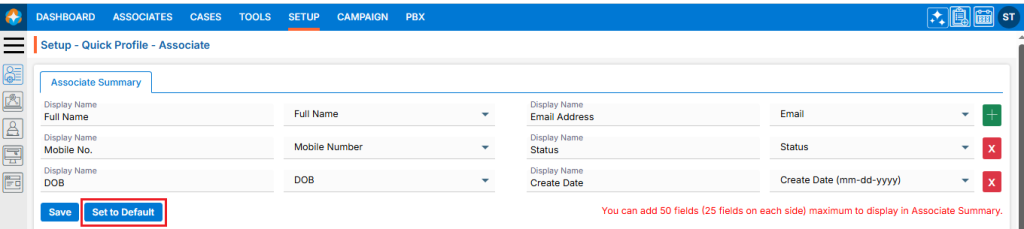
- This page will display the default Associate’s Summary setup
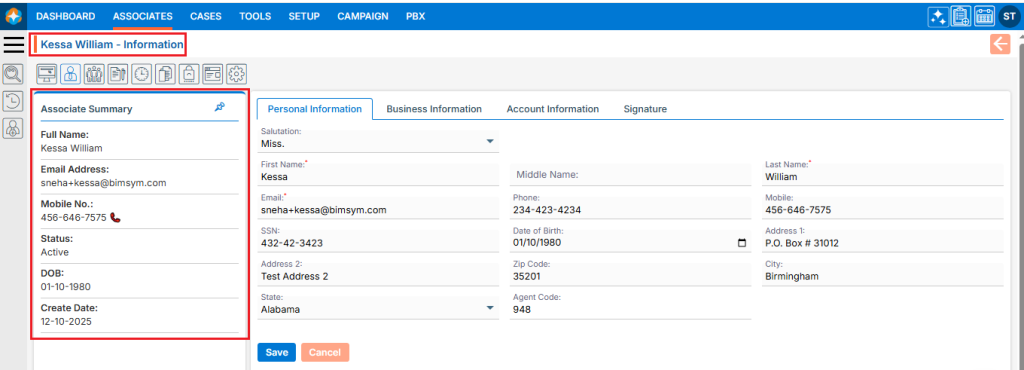
- This Associate Summary setup will be reflected under Associate > Individual Associate Window > Associate Summary, located on the left side of the page
- Users can add the new field by using the (+) sign, which is displayed in green color
- Users can remove the existing field by using the (x) sign, which is displayed in red color
- Users can also edit the existing field(s) that have already been set up
- Once the add/edit action has been taken, click on ‘Save‘

- This updated Associate summary setup will be reflected in ASSOCIATE > Individual Associate Window > Associate Summary
Restore Associate Summary Setup
- To restore the default Associate Summary setup, click on ‘Set to Default‘. The system will reset the setup, and the changes will be reflected in Associate > Individual Associate Window > Associate Summary
 0
0
 0
0